 Phone sensor instruments & measurement log

Your phone as 14 pocket instruments, with a measurement log you can export and share.
Pocketlab turns the sensors of a phone or tablet into measuring instruments: a GPS speedometer with trip log, walk-to-measure distance, a compass with true north, a sun and moon finder, a spirit level and inclinometer, a calibrated ruler, a sound level meter, a tone generator and spectrum analyser, a vibration meter, a seismograph, a step counter, a magnetometer, a light meter and a stopwatch. Every measurement can be saved to a notebook, exported as CSV, GPX, WAV or JSON and opened again; the maths runs in your browser with the same engines as the API tools. Nothing starts before you press Start, and readings stay on your device unless you save them to a shared workspace or Google Drive.
Screenshots
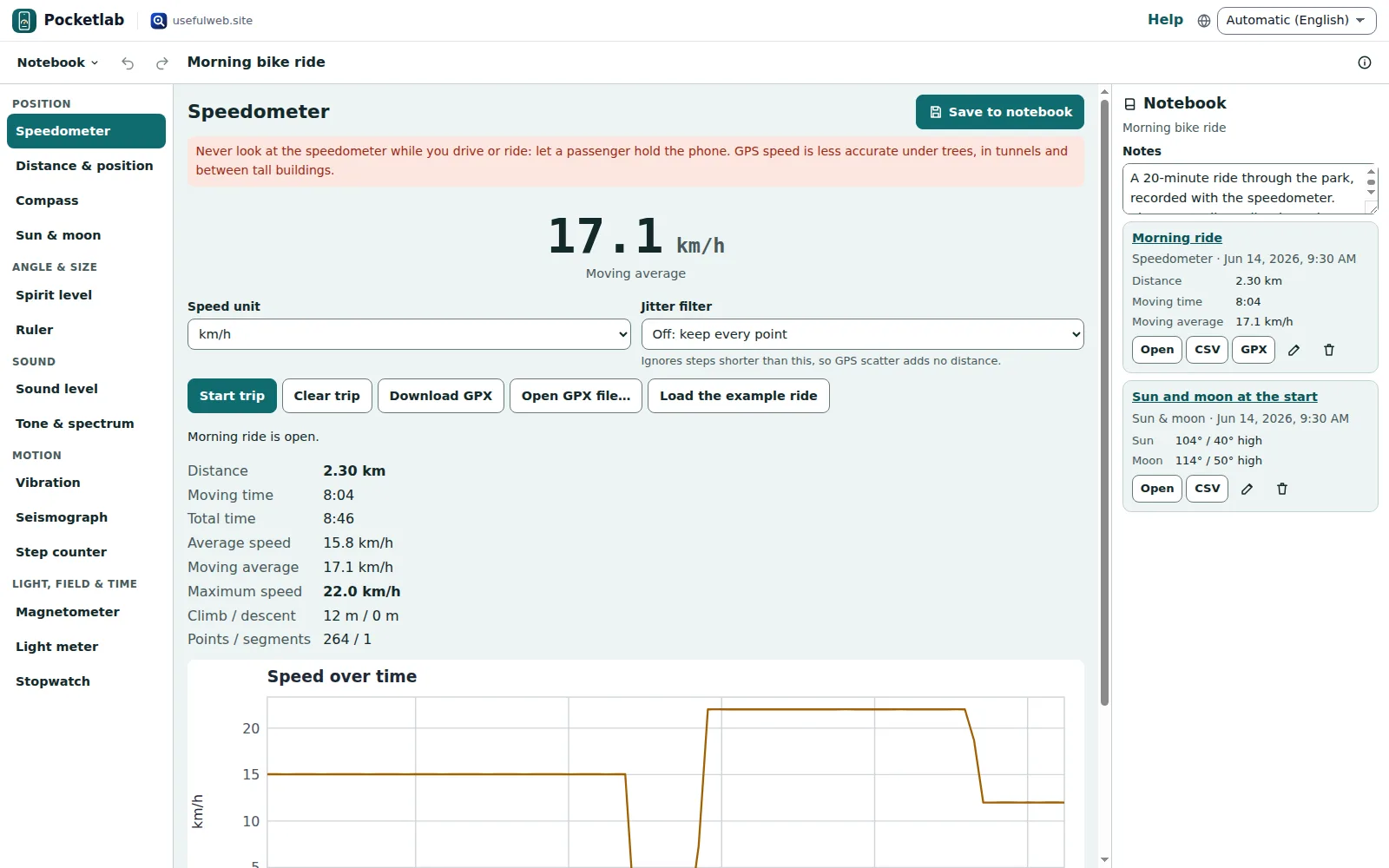
- Speedometer and trip log
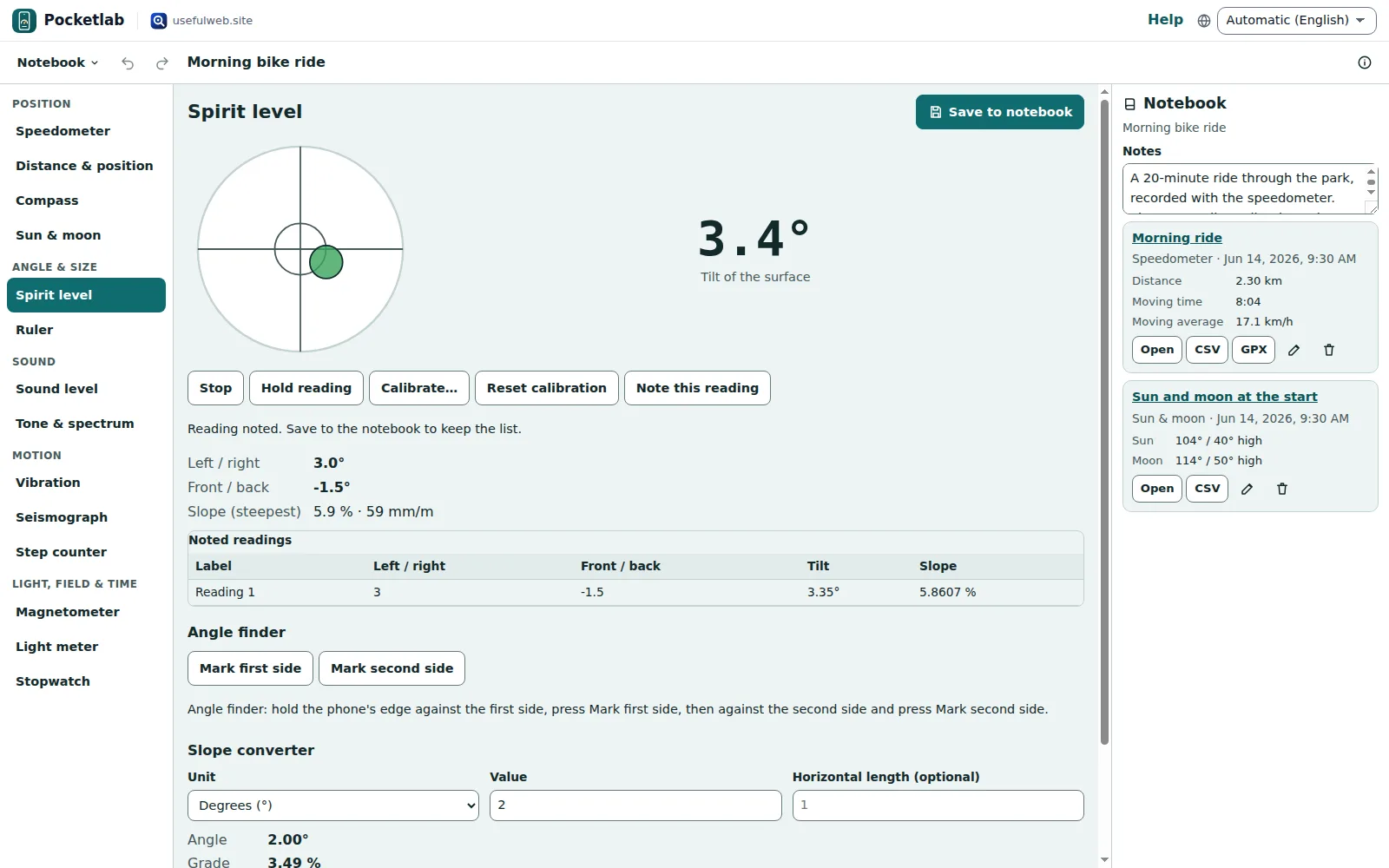 Spirit level and inclinometer
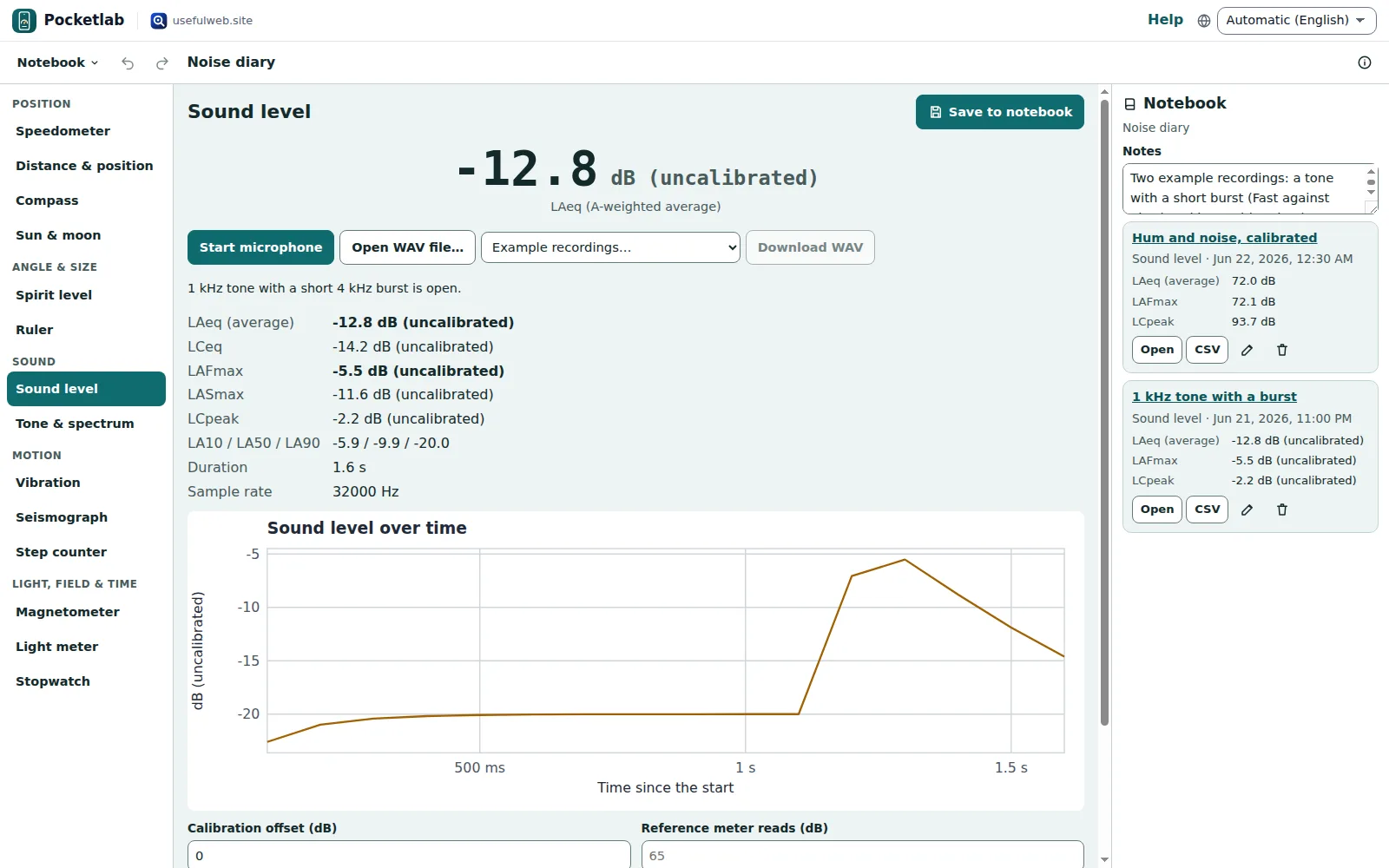 Sound level meter with dB log
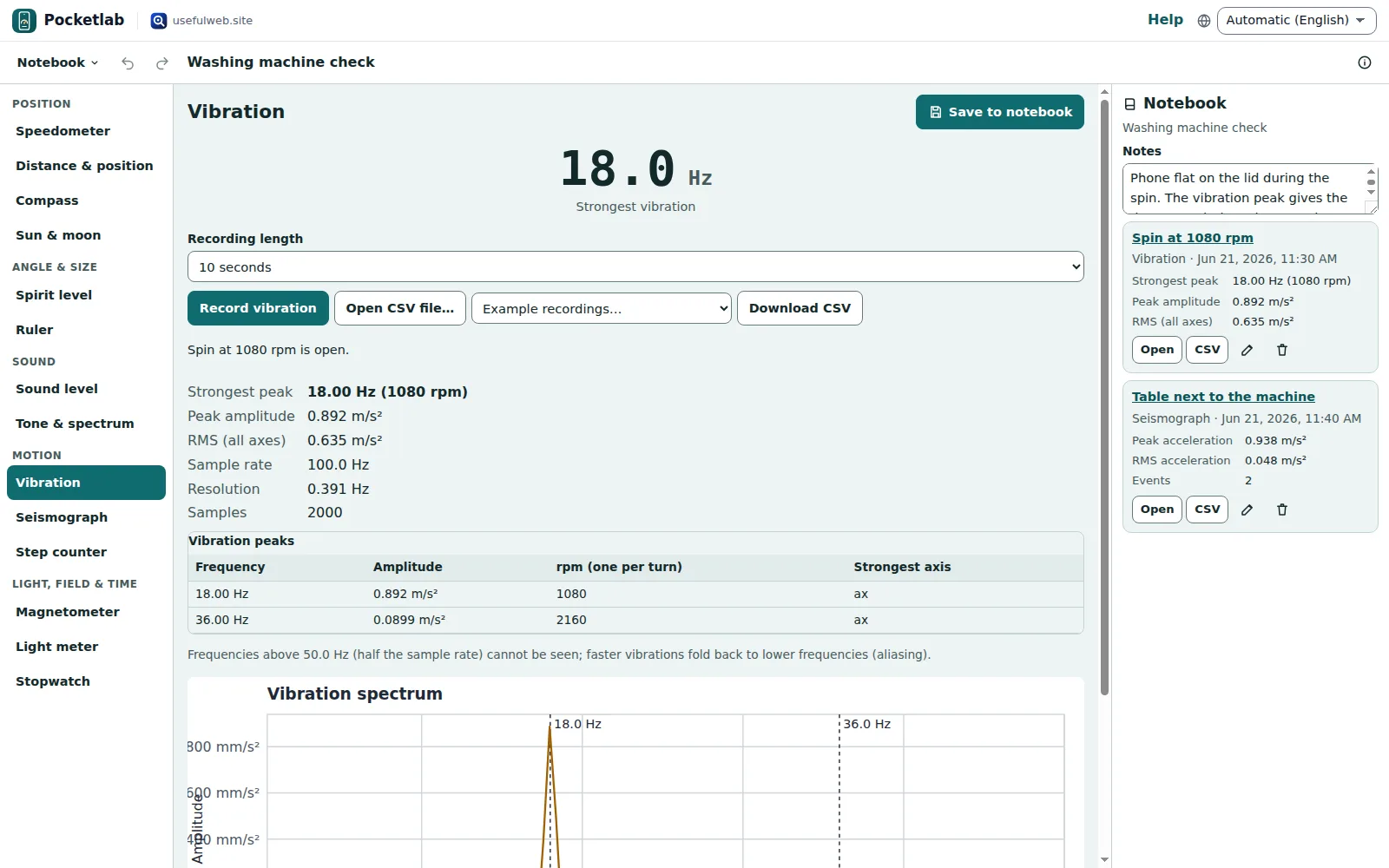 Measurement notebook
Features
Speedometer and trip log
GPS speed, distance, moving time, average and top speed, climb and a speed chart; pause into track segments and download the trip as GPX.
Walk-to-measure and position
Mark a start, walk, and get the straight-line and walked distance; latitude, longitude, height and GPS accuracy at a glance.
Compass with true north
Magnetic and true heading, with the declination of the World Magnetic Model WMM2025 for your place and date.
Sun and moon finder
Where the Sun and the Moon stand right now, their rise and set times and the Moon’s phase — point the phone with the compass to find them.
Spirit level, inclinometer and plumb line
A bubble for surfaces, an edge level and angle finder, a plumb line, slope in degrees, percent and mm per metre, and a two-step calibration.
Card-calibrated ruler
An on-screen ruler in centimetres or inches, calibrated once with a bank card so the millimetres are real.
Sound level meter with dB log
A- and C-weighted levels with Fast and Slow time weighting, Leq, Lmax, peak and L10/L90, a level-over-time log, a calibration offset and a WAV download.
Tone generator and spectrum
A sine, square, triangle or sawtooth tone from 20 Hz to 20 kHz, and a live spectrum of the microphone with the strongest frequency and its note.
Vibration spectrum
Lay the phone on a washing machine, fan or pump: the strongest vibration frequencies with amplitude and rpm.
Seismograph
A live seismogram of the shaking with peak and RMS acceleration, events found by the STA/LTA trigger, and a CSV download.
Step counter
Steps, cadence and an estimated distance from the accelerometer, with steps per minute and your own step length.
Magnetometer and metal finder
The magnetic field strength in microtesla against the Earth’s field at your place; a jump means steel or a magnet nearby.
Light meter
Lux and exposure value from the light sensor where the browser offers one, otherwise a rough estimate from the camera, with shutter speeds.
Stopwatch and lap timer
Laps with splits, the fastest and slowest lap, keyboard control and a lap table to save or download.
Measurement notebook and exports
Save any measurement to a notebook with notes, reopen and re-analyse it, and export CSV, GPX, WAV or the whole notebook as JSON.
Shared notebooks and Drive
Keep notebooks in your browser, in Google Drive or in a team workspace where members add measurements and viewers read along.


Templates
Start from a ready-made project and change it to fit.
Morning bike ride
A 2.3 km ride recorded with the speedometer: distance, moving time, average and top speed, climb, a speed chart and where the sun stood at the start.
Washing machine check
The vibration spectrum of a spin at 1080 rpm and a seismograph recording from the table next to it, with footsteps and a slammed door as events.
Walk and steps
One minute of walking in the step counter (108 steps), an evening walk as a GPS track and the length of a garden measured by walking it.
Shelves and desk light
Spirit level readings for two shelves and a window sill, desk light before and after a new lamp in lux, and a glue-drying timer.
Noise diary
Two sound level logs with a dB-over-time table: a tone with a short burst (Fast against Slow) and hum with noise, calibrated with an offset.
Built-in tools
Pocketlab uses these tools. Each one also has its own page and works on its own, in the browser, through the JSON API and through MCP.
- Pocketlab GPS Trip Stats (GPX → speed and distance) Pocketlab engineGPX track in: distance, moving time, average and maximum speed, climb and km splits.
- Pocketlab Magnetic Declination (WMM2025) Pocketlab engineMagnetic declination, inclination and field strength for any place and date (2025–2030).
- Pocketlab Sound Level (WAV → Leq, LAeq, Lmax) Pocketlab engineUpload a WAV recording: A/C/Z-weighted Leq, Fast/Slow Lmax, peak and L10/L50/L90.
- Pocketlab Vibration Spectrum (accelerometer CSV) Pocketlab engineAccelerometer CSV in, vibration spectrum out: peak frequencies, amplitudes, rpm and RMS.
- Pocketlab Step Counter (accelerometer CSV) Pocketlab engineCount steps in an accelerometer recording: steps, cadence, distance and steps per minute.
- Pocketlab Seismograph (accelerometer CSV → peaks and events) Pocketlab enginePeak and RMS shaking, a seismogram trace and STA/LTA events from an accelerometer recording.
- Pocketlab Slope Converter (degrees, %, 1:n, mm/m) Pocketlab engineConvert a slope between degrees, percent grade, 1 : n ratio and millimetres per metre.
- Pocketlab Light & Exposure Converter (lux ↔ EV ↔ shutter) Pocketlab engineConvert lux to exposure value and back, and get shutter speeds for common f-numbers.
- Skyfold Sun Position and Shadow Length Pocketlab engineSun angle and the length and direction of a shadow for any height, place and time.
- Skyfold Planet and Moon Positions Pocketlab engineWhere the Sun, Moon and planets are, and when they rise and set, for any place and time.
- Tuning Reference (String Frequencies & Temperaments) Pocketlab engineString frequencies for guitar, bass, violin and more at any A4, in equal or historical temperaments.
- RavingDesk GPS File Converter (GPX ↔ KML ↔ GeoJSON) Pocketlab engineConvert GPX, KML and GeoJSON, simplify tracks and get length, climb, descent and duration.
For AI agents
Pocketlab runs on a deterministic engine. The same functions are available as tools with a JSON API and MCP, so scripts and AI agents get exactly the results the app shows.
- Pocketlab GPS Trip Stats (GPX → speed and distance) – GPX track in: distance, moving time, average and maximum speed, climb and km splits.
Tool page ·POST https://pocketlab.usefulweb.site/api/v1/tools/ohmforge-gps-trip-stats/calculate· MCPohmforge_gps_trip_stats - Pocketlab Magnetic Declination (WMM2025) – Magnetic declination, inclination and field strength for any place and date (2025–2030).
Tool page ·POST https://pocketlab.usefulweb.site/api/v1/tools/ohmforge-magnetic-declination/calculate· MCPohmforge_magnetic_declination - Pocketlab Sound Level (WAV → Leq, LAeq, Lmax) – Upload a WAV recording: A/C/Z-weighted Leq, Fast/Slow Lmax, peak and L10/L50/L90.
Tool page ·POST https://pocketlab.usefulweb.site/api/v1/tools/ohmforge-sound-level/calculate· MCPohmforge_sound_level - Pocketlab Vibration Spectrum (accelerometer CSV) – Accelerometer CSV in, vibration spectrum out: peak frequencies, amplitudes, rpm and RMS.
Tool page ·POST https://pocketlab.usefulweb.site/api/v1/tools/ohmforge-vibration-spectrum/calculate· MCPohmforge_vibration_spectrum - Pocketlab Step Counter (accelerometer CSV) – Count steps in an accelerometer recording: steps, cadence, distance and steps per minute.
Tool page ·POST https://pocketlab.usefulweb.site/api/v1/tools/pocketlab-step-counter/calculate· MCPpocketlab_step_counter - Pocketlab Seismograph (accelerometer CSV → peaks and events) – Peak and RMS shaking, a seismogram trace and STA/LTA events from an accelerometer recording.
Tool page ·POST https://pocketlab.usefulweb.site/api/v1/tools/pocketlab-seismograph/calculate· MCPpocketlab_seismograph - Pocketlab Slope Converter (degrees, %, 1:n, mm/m) – Convert a slope between degrees, percent grade, 1 : n ratio and millimetres per metre.
Tool page ·POST https://pocketlab.usefulweb.site/api/v1/tools/pocketlab-slope-converter/calculate· MCPpocketlab_slope_converter - Pocketlab Light & Exposure Converter (lux ↔ EV ↔ shutter) – Convert lux to exposure value and back, and get shutter speeds for common f-numbers.
Tool page ·POST https://pocketlab.usefulweb.site/api/v1/tools/pocketlab-light-exposure/calculate· MCPpocketlab_light_exposure - Skyfold Sun Position and Shadow Length – Sun angle and the length and direction of a shadow for any height, place and time.
Tool page ·POST https://pocketlab.usefulweb.site/api/v1/tools/skyfold-sun-shadow/calculate· MCPskyfold_sun_shadow - Skyfold Planet and Moon Positions – Where the Sun, Moon and planets are, and when they rise and set, for any place and time.
Tool page ·POST https://pocketlab.usefulweb.site/api/v1/tools/skyfold-planet-positions/calculate· MCPskyfold_planet_positions - Tuning Reference (String Frequencies & Temperaments) – String frequencies for guitar, bass, violin and more at any A4, in equal or historical temperaments.
Tool page ·POST https://pocketlab.usefulweb.site/api/v1/tools/tonegrid-tuning-reference/calculate· MCPtonegrid_tuning_reference - RavingDesk GPS File Converter (GPX ↔ KML ↔ GeoJSON) – Convert GPX, KML and GeoJSON, simplify tracks and get length, climb, descent and duration.
Tool page ·POST https://pocketlab.usefulweb.site/api/v1/tools/ravingdesk-gps-file-converter/calculate· MCPravingdesk_gps_file_converter
- MCP endpoint (Streamable HTTP):
https://pocketlab.usefulweb.site/mcp - Project file format (JSON Schema): https://pocketlab.usefulweb.site/project.schema.json
- OpenAPI description: /openapi.json · llms.txt · API & MCP
Build a project through the API, then open it in the app with a link to https://pocketlab.usefulweb.site/app#project=<base64url JSON>.
Import & export
Import
- Pocketlab notebook (.pocketlab.json)
- GPX tracks (speedometer)
- WAV recordings (sound level meter)
- Accelerometer CSV (vibration meter, seismograph, step counter)
- Notebook link (#project=)
Export
- Pocketlab notebook (.pocketlab.json)
- Trip and walk tracks (GPX 1.1)
- Sound recording (WAV, 32-bit float)
- Accelerometer recordings (CSV, read by the tools)
- Any measurement log (CSV)
- Notebook link (#project=)
Keyboard shortcuts
| Keys | Action |
|---|---|
| Alt + 1 … Alt + 9 | Switch to one of the first nine instruments |
| Ctrl + Enter | Save the current measurement to the notebook |
| Space | Stopwatch: start or stop (when the stopwatch is shown and no field has focus) |
| L | Stopwatch: lap |
| Ctrl + Z | Undo a notebook change |
| Ctrl + Shift + Z | Redo |
| Ctrl + S | Save notebook file |
| Ctrl + O | Open notebook file |
| ? | Show keyboard shortcuts (single-key shortcuts can be switched off there) |
Frequently asked questions
Do I need to install anything?
No. Open Pocketlab in the phone’s browser (Chrome on Android, Safari on iOS) and press Start on an instrument. Add it to the home screen for quick access; the address /app#instrument=level opens the spirit level directly.
What happens to my position, audio and motion data?
They are processed in this browser tab and never uploaded. Nothing starts before you press Start; the microphone, camera and motion sensors stop on Stop, when you switch instrument and when the tab is hidden. Only measurements you save to the notebook are kept — in this browser, and in Google Drive or a team workspace only if you save them there.
How accurate are the instruments?
As accurate as the phone’s sensors: GPS a few metres, the spirit level about 0.1–0.3° after calibration, the compass a few degrees away from steel and magnets, the sound level meter only relative unless you set an offset against a real meter, the light meter about a factor of two. Every instrument says what it can and cannot do; none is certified.
Why does an instrument say there is no sensor?
Computers rarely have motion sensors, a compass or GPS, and some browsers hide them (the magnetometer and light sensor are only available in a few browsers). On a computer you can still open GPX, WAV and CSV files, compute the declination, use the ruler, stopwatch and tone generator, and convert slopes and light values.
Can my team collect measurements together?
Yes. Sign in with a passkey or Google and choose Notebook → Save to workspace. Members add measurements to the shared notebook, viewers can read and export, and changes arrive live.
Where did the Ohmforge pocket instruments go?
Here. The speedometer, spirit level, compass, sound level meter, vibration meter and ruler moved from Ohmforge to Pocketlab, with the same engines and tool addresses; old Ohmforge links such as /app#pocket=sound open the same instrument here.
Limitations
What Pocketlab does not do (yet):
- Sensors depend on the phone and the browser: the compass needs an absolute orientation sensor, the magnetometer and the light sensor are only available in a few browsers, and iOS asks for motion permission each visit.
- Not calibrated or certified: use the sound level meter, light meter and seismograph to compare, not to check legal limits or safety.
- Phones sample motion 50 to 500 times a second, so the vibration meter sees only up to half that rate; step counts suffer on stairs, in vehicles and when shuffling.
- GPS speed and distance carry a few metres of scatter and fail indoors; never look at the speedometer while you drive or ride.
- The camera light estimate assumes an average scene and the camera’s own exposure data, which many browsers do not report; then only relative brightness is shown.
- Recordings are limited to what fits a notebook (50 000 rows per log, 200 logs); long sound measurements keep only the first 60 seconds as WAV.
Tutorials
Learn Pocketlab step by step.
- Speedometer, trip log and walk-to-measure distanceUse your phone as a speedometer with trip log and GPX download, and measure a distance by walking it.Beginner 8 min
- Spirit level, plumb line, compass with true north and the sun finderLevel shelves with a calibrated spirit level, convert slopes, find true north with the compass and spot the Sun and Moon.Beginner 9 min
- Sound level meter, dB log, tone generator and spectrumMeasure A- and C-weighted sound levels, keep a dB log, calibrate against a meter, play test tones and read the spectrum.Intermediate 8 min
- Vibration spectrum, seismograph and step counterFind a machine's vibration frequency, watch a live seismogram with events and count steps with cadence and distance.Intermediate 9 min
- Light meter, magnetometer, ruler and stopwatchEstimate lux and exposure values, find steel with the magnetometer, measure with a card-calibrated ruler and time laps.Beginner 7 min
- The measurement notebook — exports, Drive and shared notebooksSave measurements to a notebook, re-analyse them, export CSV, GPX and JSON, use Google Drive and share notebooks with a team.Beginner 7 min
Ready to try it?
Other apps
-

Twinworks
Factory digital twin & production simulation
Model a production line, simulate it and find the bottleneck — free, in your browser.
-

Learning Shorts
Animated explainer video studio
Turn an idea into a narrated, animated short video with presenters, props and captions.
-

Chainscope
Web3 investigation desk
Investigate transactions, bridges, contracts, DAOs and wallets in one case file.
-

RavingDesk
Paper trading & data workspace
Practise trading on paper and chart your data: orders, risk, datasets, analyses, reports.
-

Lumina
Photo editor & image toolkit
Bring out what you saw. A free photo studio, right in your browser.
-

Ledgerly
Household finance & life-admin desk
Budgets, bills, subscriptions, loans, contracts and deadlines on one private desk.
-

Ohmforge
Virtual electronics workbench
Draw a circuit, switch it on, and measure it with real-feeling bench instruments.
-

Hearth
Home & travel planner
Plan meals, chores, home care, moves, trips and good days for your household in one place.
-

Flipline
Drawing, storyboards & animation
A few drawings. A little life. Make a flipbook in your browser.
-

Soundscape Atlas
Sound map & ambience studio
Find real field recordings on a world map and mix them into calm, editable soundscapes.
-

Playcards
Card games table
46 card games from Skat and Jass to Scopa and Daifugō, vs the computer, at home or online.
-

Proofline
Math notebook
Solve, graph, test and visualise in one notebook — with data, findings and a report.
-

Signalhouse
Website & internet infrastructure inspector
Inspect DNS, TLS, mail, CDN and routing of all your domains — and see what changed.
-

Kerfwise
Cabinet & furniture CAD
Design cabinets and furniture, get cut lists, optimised sheet layouts, costs and drawings.
-

Opsdeck
Developer & ops workbench
One deck for CI failures, cron, traces, k8s events, API diffs, query plans and Terraform.
-

ObscurIQ
OSINT case desk
Organize public-source research: cases, a research log, pivots and indicators.
-

Reelcraft
Audio, video & image batch studio
Audio, video & image batch studio: cut, convert, compress, subtitle, reframe
-

Paperwell
Document studio: PDFs, OCR, redaction, forms & contract reading
Your paperwork in one dossier: PDF tools, OCR, redaction, forms and contract reading.
-

Renderloom
3D scene & material studio
Shape a scene. Find its light. Keep every idea editable.
-

Keysmith
Crypto & secrets lab
Audit certificates, keys, TLS and passwords in one lab; secrets stay on your device.
-

Fieldday
Sports club & training organiser
Fixtures, brackets, ratings and training plans for your club — in one workspace.
-

Threadsmith
Embroidery digitizing studio
Draw or import artwork, turn it into stitches, export DST, PES, JEF or EXP files.
-

Provenance
Software supply-chain security desk
SBOMs, CVEs, containers and licences in one risk register — free, in your browser.
-

Agentlab
AI-agent & LLM workbench
Test an AI agent before release: permissions, traces, costs, citations and output checks.
-

Tonegrid
Tone matrix & beat sequencer
Light up squares to build melodies, beats and acid bass, then arrange them into songs.
-

Pageboard
Website inspiration boards
Collect website references, sort them with tags and arrange them on a moodboard.
-

Printshop
Printables studio
QR codes, calendars, labels, puzzles and posters — print-perfect PDFs in seconds.
-

Kinetica
Robot motion studio
Simulate robot arms in your browser: kinematics, trajectories, collisions, program export.
-

Bundlekeep
Local project backup
Back up projects from every usefulweb app into one file, check it and restore any part.
-

Panelcraft
Comic books & figure references
Shape a page. Arrange a book. Give your story a voice.
-

Focus Room
Ambience player & focus timer
A calm room for your screen: ambience, slow visuals, focus timers, clocks and big signs.
-

Skyfold
Sky & space atlas
See the sky of any place and moment, plan eclipses and satellite passes, print star maps.
-

Cartograph
Map posters, route art & atlas
Map prints, GPS-art routes, fair meeting points, true sizes, flags and country quizzes.
-

Deckwright
Slide deck studio
Write Markdown, get an accessible slide deck — charts, diagrams, PDF, HTML and PowerPoint.
-

Sizewise
Scale & big-number visualiser
Make sizes, amounts and big numbers feel real: to-scale lineups, fit counts and stacks.
-

Wikinest
Knowledge base and team wiki
A team wiki: spaces, page trees, versions, comments and permissions per space.
-

Laneboard
Kanban boards
Kanban boards in your browser: lists, cards, checklists, due dates and flow charts.
-

Trackwell
Issue tracker
Issue tracking with workflows, sprints, SLAs and team roles, in your browser.
-

Timeslice
Time tracker & timesheets
Track time on your own tasks, see where it went in charts and share a read-only report.
-

Greenplot
Garden planner & manager
Plan your garden to scale, sow on time, log every harvest and share the plot.
-

Sketchboard
Diagrams, sketches and plans
Draw diagrams, flowcharts, mind maps and floor plans on an endless board.
-

Codeharbor
Coding IDE
A coding IDE in your browser: edit, preview and run web projects safely, then share them.
-

GISela
Browser GIS
A GIS in your browser: layers, attribute tables, styling, analysis and print layouts.
-

Rapport
CRM
A CRM for contacts, companies, deals and quotes — local-first, shared with your team.
-

Puttopia
Funny 3D minigolf game
Funny 3D minigolf: windmills, loops, portals and cheering gummy bears.